Run early bird offers, reward partners, and give groups a better rate with discounts on selected tickets or qualifying orders.
Give attendees a reason to book early, bring a team, or add a ticket to their order. Offer a fixed amount or percentage off. You can discount all tickets for selected events, specific ticket types, or a qualifying order.
Six promotion ideas for your next event
Use these example codes as a starting point for your own offers.
Choose what to discount
- One ticket type. Share
PARTNER10with a local association. Members get 10% off your workshop ticket. Other tickets stay at full price. - The whole order. Use
WEEKEND20to take $20 off once when every ticket in the order is for one of your three selected workshops.
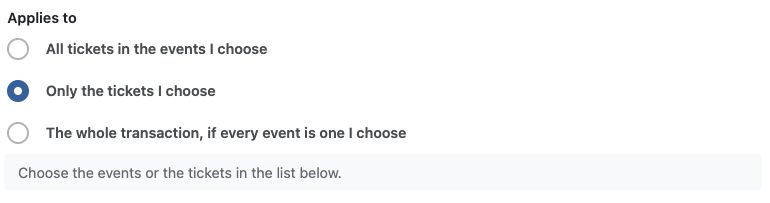
For PARTNER10, choose specific tickets. For WEEKEND20, choose the whole transaction.
Set a rule for checkout
- Minimum spend. Offer
SPEND500for 10% off qualifying orders of $500 or more before tax. - Buy one ticket and save on another. Offer
DINNER15for 15% off dinner when the order includes a conference pass. The pass stays at full price.
Give larger orders a better deal
- Tiers by ticket count. Set a five-ticket minimum for
TEAM. Give 10% off at five eligible tickets, 15% at ten, and 20% at twenty. An order with 12 eligible tickets gets 15% off all 12.
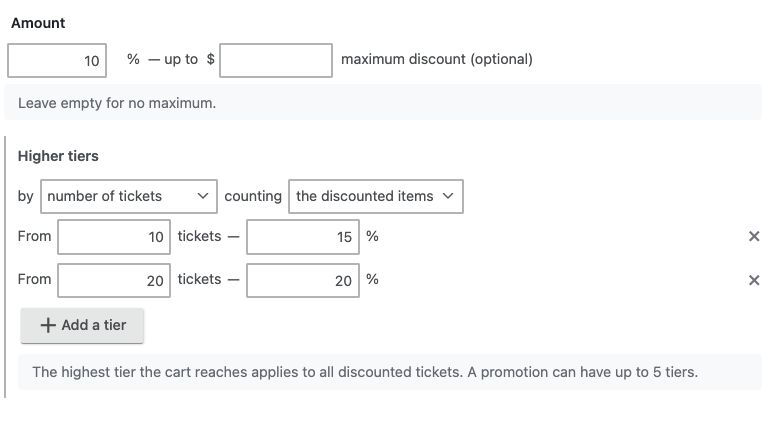
For TEAM, set a five-ticket minimum under Conditions, then set the base discount to 10% and add tiers at 10 and 20 eligible tickets.
- Tiers by order amount. Offer
RETURNfor $25 off a qualifying order of $300 or more before tax. At $600 before tax, the discount increases to $50.
How promotions work at checkout
Attendees enter a promo code at the payment step. To apply a discount automatically to qualifying orders, leave the code field blank when you create the promotion.
Set when an offer starts and ends, how many times it can be used, and the most a percentage discount can take off an order. When an order is close to the next tier, checkout can show how many more tickets or how much more spend unlocks it. See how to set up a promotion.

Apply a promotion code during registration checkout

A confirmation is shown when a discount code is activated

An attendee will see the discount applied in the registration checkout summary
Event Smart worked great for setting up my high school reunion. The site provided me with every option that I needed. I was able to easily link the events payments to PayPal. What I really like was that we were trying to promote people to pay early so we could get a guaranteed head count. I was able to setup multiple ticket prices that and have the early bird discounts expire at a certain date. I highly recommend this site to anyone that is planning events. We will definitely use the site going forward. – Jeff Poltis
Set up your first promotion
Promotions & Discount Codes is included in the Business plan and available as a feature upgrade. See plans and pricing.
Once the feature is active on your site, go to Event Smart → Promotions → Add New to create your first offer. New to Event Smart? Try the Business plan free for 14 days.
Billing information is not required to start your complimentary 2-week trial of the business plan for Event Smart.
Promotion questions
Can I discount one ticket type?
Yes. Under Applies to, choose Only the tickets I choose. For example, give 10% off VIP tickets while general admission stays at full price.
What if the cart includes an event I didn’t select?
A whole-order promotion applies only when every ticket in the order is for an event you selected.
Can I see which codes attendees used?
Yes. The Registrations CSV report includes a promotion code column.